
Decision rights map template
Download a one-page template that makes “who decides” explicit, before the moment forces it.
Draft a first pass in 15 minutes. Tighten it after one short rehearsal.
No spam. Unsubscribe anytime. We will email the template plus a short set of follow-ups on decision readiness.
Stop decision fights by assigning one owner for each high-stakes call.
Move faster under stress with time-boxes and automatic escalation triggers.
Reduce preventable damage by making consults clear, without turning them into votes.
Why this matters now
When pressure hits, teams do not fail because they lack a document. They fail because authority gets unclear, decisions get debated in real time, and nobody wants to own the call.
Unclear decision rights create delays, conflict, and preventable damage. This template is designed to make decision ownership visible, time-bound, and executable.


What's inside
A Clear “Who Decides”
Default rules across Security, Legal, Comms, Operations, and Exec, with simple escalation boundaries.
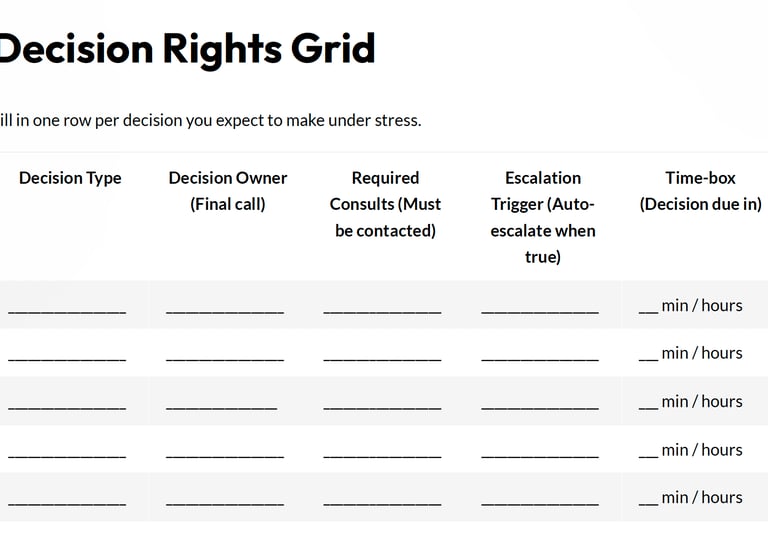
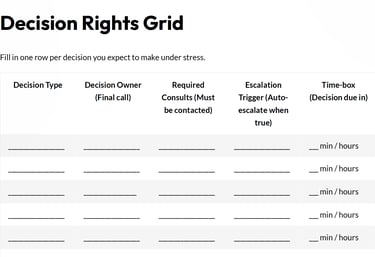
A Decision Rights Grid
One row per decision. Includes the final decision owner, required consults, escalation trigger, and time-box.
An Escalation Triggers Library
Practical triggers that prevent “we argued too long” and force clean escalation when it matters.
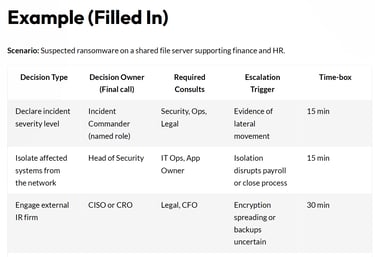
A Filled-In Example
A ransomware scenario showing what “good” looks like.
Two Debrief Questions
A quick after-action to tighten the map after your first run.
Template preview
Here is what you will get. Three quick screenshots so you can judge fit in 10 seconds.
A Decision Rights Grid
One row per decision. Name the decision owner, required consults, the time-box, and the escalation trigger.
Default “Who Decides” Rules
Baseline decision ownership across Security, Legal, Comms, Ops, and Exec. Use it to stop escalations that should never happen.
Practical triggers that force clean escalation when the clock is running. Includes a filled ransomware example so you can model ‘good.’
Escalation Triggers Plus a Filled Example


Who the template is for
Best for
CEOs, COOs, CROs, General Counsel, Audit and Risk leaders
CISOs, Heads of Security, IT leaders, Incident Response leads
Comms leaders, Operations leaders, Business continuity owners
Best when
Ransomware or suspected intrusion
Customer data exposure risk
Vendor outage or third-party compromise
AI policy breach or public allegation
Any situation where you expect exec attention and time pressure


How to use the template (3 steps)
Pick one scenario you actually worry about (ransomware, data leak, vendor outage, AI policy breach, public allegation).
List 6 to 10 decisions that always create friction. Assign one decision owner per row. Consults are voices, not votes.
Set the time-box. If it expires, escalation is automatic. Run one short rehearsal, then update the map based on what broke.


Quick FAQs
Is this template only for cybersecurity incidents?
No. Use it for any high-stakes moment where decisions, handoffs, and external messaging can spiral fast.
We already have a RACI. Why do we need the template?
RACIs often describe responsibility. This map forces a final decision owner, a time-box, and an escalation trigger so you move.
How long does it take to complete?
You can draft a first pass in 15 minutes, then tighten it after a short simulation rehearsal.
Can we customize the escalation triggers?
Yes. Start with defaults, then write down overrides and thresholds that match your business reality.
Who should fill the template out?
The people who will actually be in the room when it hits. Include the decision owners and the required consults.
What should we do after we fill it out?
Run one short rehearsal, then answer the two debrief questions to lock in “pre-approved” decisions that will save time next time.
Ready to build decision readiness you can trust?
No scrambling. No debate loops. Clear calls, clean handoffs.

